👤 By whycalculator Team 📅 Last Updated March 09, 2026
Sales Per Hour
Disclaimer: While we strive to ensure the accuracy of our calculator tools, we cannot be held responsible for any damages or financial losses resulting from their use.
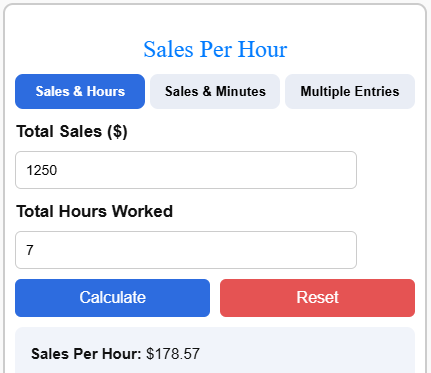
Sales per hour is an important metric that helps businesses understand how efficiently they generate revenue during working hours. Whether you run a retail store, restaurant, or online business, tracking hourly sales can reveal peak performance periods and areas that need improvement. This Sales Per Hour Calculator helps you quickly measure how much revenue is generated for each hour worked.
Simply enter your total sales and time worked to see the average sales rate per hour. You can also calculate sales using minutes or combine multiple sales entries for a more accurate analysis.
How to Calculate Sales Per Hour
To calculate sales per hour, select a specific time period to analyze, such as a single day, a particular shift, or a specific hour of operation. First, determine the total number of hours the business was active during that chosen period.
Next, identify the total revenue generated during that exact timeframe. Finally, divide the total sales figure by the total number of hours to arrive at your sales per hour.
Sales Per Hour Formula
The basic formula for calculating Sales Per Hour (SPH) is:
SPH = Total Sales ÷ Total Hours Worked
This formula divides the total revenue generated during a specific time period by the number of hours worked.
The result shows the average sales revenue generated per hour.
Example 1: Basic SPH Calculation
Suppose a retail store generated $1,200 in total sales during an 8-hour shift.
SPH = 1,200 ÷ 8
SPH = $150
This means the store generated an average of $150 in sales every hour.
Example 2: Calculating Sales Using Minutes
Sometimes sales data is recorded in minutes instead of hours. In this case, first convert minutes into hours.
For example, if a business made $500 in sales in 120 minutes:
First convert minutes to hours:
120 minutes ÷ 60 = 2 hours
Now apply the formula:
SPH = 500 ÷ 2
SPH = $250
This means the business is generating an average of $250 per hour.
Example 3: Multiple Sales Periods
If you have multiple sales entries from different time periods, you can add all sales together and divide by the total hours worked.
For example:
- Morning shift: $300 sales in 2 hours
- Afternoon shift: $450 sales in 3 hours
- Evening shift: $250 sales in 2 hours
Total Sales = $300 + $450 + $250 = $1,000
Total Hours = 2 + 3 + 2 = 7 hours
SPH = 1,000 ÷ 7 = $142.86
So the average sales generated per hour is approximately $142.86.
Using a sph calculator makes this process faster and helps businesses quickly analyze sales performance across different working periods.
SPH Calculation Examples
| Total Sales ($) | Total Hours Worked | Sales Per Hour ($) |
|---|---|---|
| 800 | 8 | 100 |
| 1,200 | 8 | 150 |
| 900 | 6 | 150 |
| 2,000 | 10 | 200 |
| 750 | 5 | 150 |
| 1,500 | 12 | 125 |
| 3,000 | 15 | 200 |
| 600 | 4 | 150 |
Related Calculators: